框架OP实现不一致问题
当从Mxnet转换模型到ONNX时,如果模型是带有PReLU OP的(在人脸识别网络很常见),就是一个大坑了。主要有两个问题,当从mxnet转为ONNX时,PReLU的slope参数维度可能会导致onnxruntime推理时失败,报错大概长这样:
2)[ONNXRuntimeError] : 6 : RUNTIME_EXCEPTION : Non-zero status code returned while running PRelu node. Name:'conv_1_relu'...... Attempting to broadcast an axis by a dimension other than 1. 56 by 64
这个错误产生的原因可能是MxNet的版本问题(https://github.com/apache/incubator-mxnet/issues/17821),这个时候的解决办法就是:修改PRelu层的slope参数的shape,不仅包括type参数,对应的slope值也要修改来和shape对应。
核心代码如下:
graph.input.remove(input_map[input_name])
new_nv = helper.make_tensor_value_info(input_name, TensorProto.FLOAT, [input_dim_val,1,1])
graph.input.extend([new_nv])
想了解更加详细的信息可以参考问后的资料2和资料3。
这个问题其实算是个小问题,我们自己在ONNX模型上fix一下即可。下一个问题就是如果我们将处理好之后的ONNX通过TensorRT进行部署的话,我们会发现TensorRT不支持PReLU这个OP,这个时候解决办法要么是TensorRT自定义PReLU插件,但是这种方法会打破TensorRT中conv+bn+relu的op fusion,速度会变慢,并且如果要做量化部署似乎是不可行的。所以这个时候一般会采用另外一种解决办法,使用relu和scale op来组合成PReLU,如下图所示:
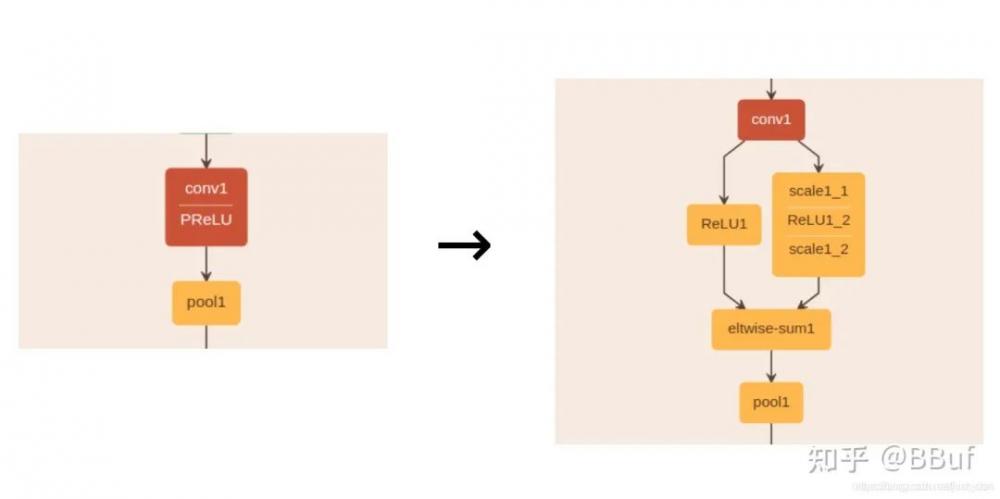
所以,我们在onnx模型中只需要按照这种方法将PReLU节点进行等价替换就可以了。
这个地方以PReLU列举了一个框架OP实现不一致的问题,比如大老师最新文章也介绍的就是squeeze OP在Pytorch和ONNX实现时的不一致导致ONNX模型变得很复杂,这种问题感觉是基于ONNX支持模型部署时的常见问题,虽然onnx-simplifier已经解决了一些问题,但也不能够完全解决。
其它问题
当我们使用tf2onnx工具将TensorFlow模型转为ONNX模型时,模型的输入batch维度没有被设置,我们需要自行添加。解决代码如下:
# 为onnx模型增加batch维度
    def set_model_input_batch(self, index=0, name=None, batch_size=4):
        model_input = None
        if name is not None:
            for ipt in self.model.graph.input:
                if ipt.name == name:
                    model_input = ipt
        else:
            model_input = self.model.graph.input[index]
        if model_input:
            tensor_dim = model_input.type.tensor_type.shape.dim
            tensor_dim[0].ClearField("dim_param")
            tensor_dim[0].dim_value = batch_size
        else:
            print('get model input failed, check index or name')
当我们基于ONNX和TensorRT部署风格迁移模型,里面有Instance Norm OP的时候,可能会发现结果不准确,这个问题在这里被提出:https://forums.developer.nvidia.com/t/inference-result-inaccurate-with-conv-and-instancenormalization-under-certain-conditions/111617。经过debug发现这个问题出在这里:https://github.com/onnx/onnx-tensorrt/blob/5dca8737851118f6ab8a33ea1f7bcb7c9f06caf5/builtin_op_importers.cpp#L1557。

问题比较明显了,instancenorm op里面的eps只支持>=1e-4的,所以要么注释掉这个限制条件,要么直接在ONNX模型中修改instancenorm op的eps属性,代码实现如下:
# 给ONNX模型中的目标节点设置指定属性
# 调用方式为:set_node_attribute(in_node, "epsilon", 1e-5)
# 其中in_node就是所有的instancenorm op。
    def set_node_attribute(self, target_node, attr_name, attr_value):
        flag = False
        for attr in target_node.attribute:
            if (attr.name == attr_name):
                if attr.type == 1:
                    attr.f = attr_value
                elif attr.type == 2:
                    attr.i = attr_value
                elif attr.type == 3:
                    attr.s = attr_value
                elif attr.type == 4:
                    attr.t = attr_value
                elif attr.type == 5:
                    attr.g = attr_value
                # NOTE: For repeated composite types, we should use something like
                # del attr.xxx[:]
                # attr.xxx.extend([n1, n2, n3])
                elif attr.type == 6:
                    attr.floats[:] = attr_value
                elif attr.type == 7:
                    attr.ints[:] = attr_value
                elif attr.type == 8:
                    attr.strings[:] = attr_value
                else:
                    print("unsupported attribute data type with attribute name")
                    return False
                flag = True
        if not flag:
            # attribute not in original node
            print("Warning: you are appending a new attribute to the node!")
            target_node.attribute.append(helper.make_attribute(attr_name, attr_value))
            flag = True
        return flag
当我们使用了Pytorch里面的[]索引操作或者其它需要判断的情况,ONNX模型会多出一些if OP,这个时候这个if OP的输入已经是一个确定的True,因为我们已经介绍过为False那部分的子图会被丢掉。这个时候建议过一遍最新的onnx-simplifier或者手动删除所有的if OP,代码实现如下:
# 通过op的类型获取onnx模型的计算节点
    def get_nodes_by_optype(self, typename):
        nodes = []
        for node in self.model.graph.node:
            if node.op_type == typename:
                nodes.append(node)
        return nodes
# 移除ONNX模型中的目标节点
    def remove_node(self, target_node):
        '''
            删除只有一个输入和输出的节点
        '''
        node_input = target_node.input[0]
        node_output = target_node.output[0]
        # 将后继节点的输入设置为目标节点的前置节点
        for node in self.model.graph.node:
            for i, n in enumerate(node.input):
                if n == node_output:
                    node.input[i] = node_input
        target_names = set(target_node.input) & set([weight.name for weight in self.model.graph.initializer])
        self.remove_weights(target_names)
        target_names.add(node_output)
        self.remove_inputs(target_names)
        self.remove_value_infos(target_names)
        self.model.graph.node.remove(target_node)
具体顺序就是先获取所有if类型的OP,然后删除这些节点。
0x4. ONNXRuntime介绍及用法
ONNXRuntime是微软推出的一个推理框架,似乎最新版都支持训练功能了,用户可以非常方便的运行ONNX模型。ONNXRuntime支持多种运行后端包括CPU,GPU,TensorRT,DML等。ONNXRuntime是专为ONNX打造的框架,虽然我们大多数人把ONNX只是当成工具人,但微软可不这样想,ONNX统一所有框架的IR表示应该是终极理想吧。从使用者的角度我们简单分析一下ONNXRuntime即可。
import numpy as np
import onnx
import onnxruntime as ort
image = cv2.imread("image.jpg")
image = np.expand_dims(image, axis=0)
onnx_model = onnx.load_model("resnet18.onnx")
sess = ort.InferenceSession(onnx_model.SerializeToString())
sess.set_providers(['CPUExecutionProvider'])
input_name = sess.get_inputs()[0].name
output_name = sess.get_outputs()[0].name
output = sess.run([output_name], {input_name : image_data})
prob = np.squeeze(output[0])
print("predicting label:", np.argmax(prob))
这里展示了一个使用ONNXRuntime推理ResNet18网络模型的例子,可以看到ONNXRuntime在推理一个ONNX模型时大概分为Session构造,模型加载与初始化和运行阶段(和静态图框架类似)。ONNXRuntime框架是使用C++开发,同时使用Wapper技术封装了Python接口易于用户使用。
从使用者的角度来说,知道怎么用就可以了,如果要了解框架内部的知识请移步源码(https://github.com/microsoft/onnxruntime)和参考资料6。
0x5. 调试工具
会逐渐补充一些解决ONNX模型出现的BUG或者修改,调试ONNX模型的代码到这里:https://github.com/BBuf/onnx_learn 。这一节主要介绍几个工具类函数结合ONNXRuntime来调试ONNX模型。
假设我们通过Pytorch导出了一个ONNX模型,在和Pytorch有相同输入的情况下输出结果却不正确。这个时候我们要定位问题肯定需要获取ONNX模型指定OP的特征值进行对比,但是ONNX模型的输出在导出模型的时候已经固定了,这个时候应该怎么做?
首先,我们需要通过名字获取ONNX模型中的计算节点,实现如下:
# 通过名字获取onnx模型中的计算节点
    def get_node_by_name(self, name):
        for node in self.model.graph.node:
            if node.name == name:
                return node
然后把这个我们想看的节点扩展到ONNX的输出节点列表里面去,实现如下:
 # 将target_node添加到ONNX模型中作为输出节点
    def add_extra_output(self, target_node, output_name):
        target_output = target_node.output[0]
        extra_shape = []
        for vi in self.model.graph.value_info:
            if vi.name == target_output:
                extra_elem_type = vi.type.tensor_type.elem_type
                for s in vi.type.tensor_type.shape.dim:
                    extra_shape.append(s.dim_value)
        extra_output = helper.make_tensor_value_info(
                                output_name,
                                extra_elem_type,
                                extra_shape
                            )
        identity_node = helper.make_node('Identity', inputs=[target_output], outputs=[output_name], name=output_name)
        self.model.graph.node.append(identity_node)
        self.model.graph.output.append(extra_output)
然后修改一下onnxruntime推理程序中的输出节点为我们指定的节点就可以拿到指定节点的推理结果了,和Pytorch对比一下我们就可以知道是哪一层出错了。
这里介绍的是如何查看ONNX在确定输入的情况下如何拿到推理结果,如果我们想要获取ONNX模型中某个节点的信息又可以怎么做呢?这个就结合上一次推文讲的ONNX的结构来看就比较容易了。例如查看某个指定节点的属性代码实现如下:
def show_node_attributes(node):
    print("="*10, "attributes of node: ", node.name, "="*10)
    for attr in node.attribute:
        print(attr.name)
    print("="*60)
查看指定节点的输入节点的名字实现如下:
def show_node_inputs(node):
    # Generally, the first input is the truely input
    # and the rest input is weight initializer
    print("="*10, "inputs of node: ", node.name, "="*10)
    for input_name in node.input:
        print(input_name)  # type of input_name is str
    print("="*60)
...
0x6. 总结
这篇文章从多个角度探索了ONNX,从ONNX的导出到ONNX和Caffe的对比,以及使用ONNX遭遇的困难以及一些解决办法,另外还介绍了ONNXRuntime以及如何基于ONNXRuntime来调试ONNX模型等,后续会继续结合ONNX做一些探索性工作。
参考资料:
资料1:https://zhuanlan.zhihu.com/p/128974102
资料2:https://zhuanlan.zhihu.com/p/165294876
资料3:https://zhuanlan.zhihu.com/p/212893519
资料4:https://blog.csdn.net/zsf10220208/article/details/107457820
资料5:https://github.com/bindog/onnx-surgery
资料6:https://zhuanlan.zhihu.com/p/346544539
资料7:https://github.com/daquexian/onnx-simplifier
本文仅做学术分享,如有侵权,请联系删文。
*博客内容为网友个人发布,仅代表博主个人观点,如有侵权请联系工作人员删除。
 发布文章
发布文章